How to get access to NHR@SW computing time
This guide takes you from choosing the appropriate project type through application, review, allocation, acknowledgements, and reporting.
-
Am I eligible to apply?
You are on the right track if:
- You want to apply for computing time.
- You are a scientist with a doctoral degree and are affiliated with an accredited German university.
- Researchers without a doctoral degree may also use the systems when working within an approved project.
-
How much computing time do I need?
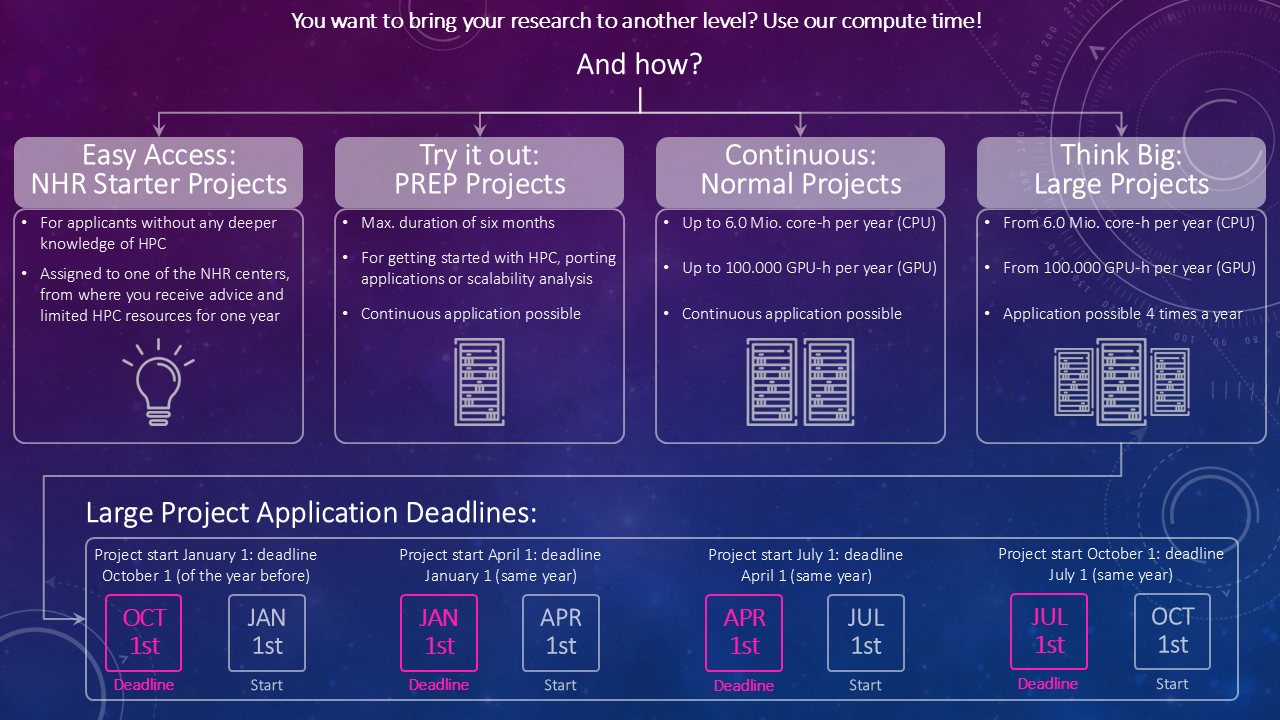
Normal projects
Up to 20 million CPU core-hours and up to 100,000 GPU-hours per year. Applications can be submitted continuously; please also note the review process in Step 7.
Large projects
Starting at 20 million CPU core-hours or 100,000 GPU-hours per year. Applications can be submitted four times per year.
PREP projects
Up to six months for preparatory work such as application porting or scalability analysis. Applications can be submitted continuously.
NHR Starter projects
For applicants who are new to HPC resource applications. An NHR center provides advice and limited HPC resources for one year.
Start your application
Please select NHR@Süd-West during registration.
-
Write your project description
For normal and large projects, use the mandatory NHR application template. For PREP projects, only a short abstract is required.
The project description must not exceed 10 pages using an 11-point font. Follow the instructions for each section of the template.
Important: Applications that do not use the required template may be rejected. -
Complete the electronic application form
Complete all sections of the online application form in JARDS carefully. Incomplete information may lead to a substantial reduction in resources or rejection of the proposal.
In addition to technical information about the planned simulations, list all computing-time applications submitted to German computing centers during the previous three years, whether or not they are related to the current proposal.
-
Upload your documents and finalize the application
Upload your project description as a PDF in the Upload files section of the electronic application. Completeness and verifiability are considered during assessment; missing information can reduce the granted computing time or lead to rejection.
If you want to add supplementary information, such as articles that have not yet been published, compile it in a separate PDF and upload it as supplementary material.
-
Sign and submit the application
Finalizing the project application generates a form. The project’s principal investigator must sign this form and upload it to JARDS.
-
The review process
Normal NHR projects receive an initial quota after technical review. This quota is increased after the proposal has received two positive scientific reviews.
The final allocation decision is made by an NHR@SW panel in conjunction with decisions on NHR Large projects. The panel meets quarterly.
-
Acknowledge the computing resources
Publications and presentations containing results obtained on NHR@SW systems must include the acknowledgement for the system used.
Goethe-NHR
The authors gratefully acknowledge the computing time provided to them at the NHR Center NHR@SW at Goethe University Frankfurt (project number p0020XXX). This is funded by the Federal Ministry of Education and Research, and the state governments participating on the basis of the resolutions of the GWK for national high performance computing at universities (www.nhr-verein.de/unsere-partner).
MOGON systems
The authors gratefully acknowledge the computing time provided to them at the NHR Center NHR@SW at Johannes Gutenberg University Mainz (project number p0020XXX). This is funded by the Federal Ministry of Education and Research, and the state governments participating on the basis of the resolutions of the GWK for national high performance computing at universities (www.nhr-verein.de/unsere-partner).
-
Write a final or status report
At the end of the project, submit the mandatory final report within three months after the allocation period ends. If you want to extend the project and request additional computing time, submit a status report instead.
Use the final or status report template, available in PDF, Word, and LaTeX formats. The report must not exceed two pages using an 11-point font. Upload the report and associated publications to JARDS.
The principal investigator must also provide contributions and information for NHR@SW public reports upon request.